
DiceCheck-x6.0.0.1 - Download
You'll be able to download in few seconds.
Publisher Description
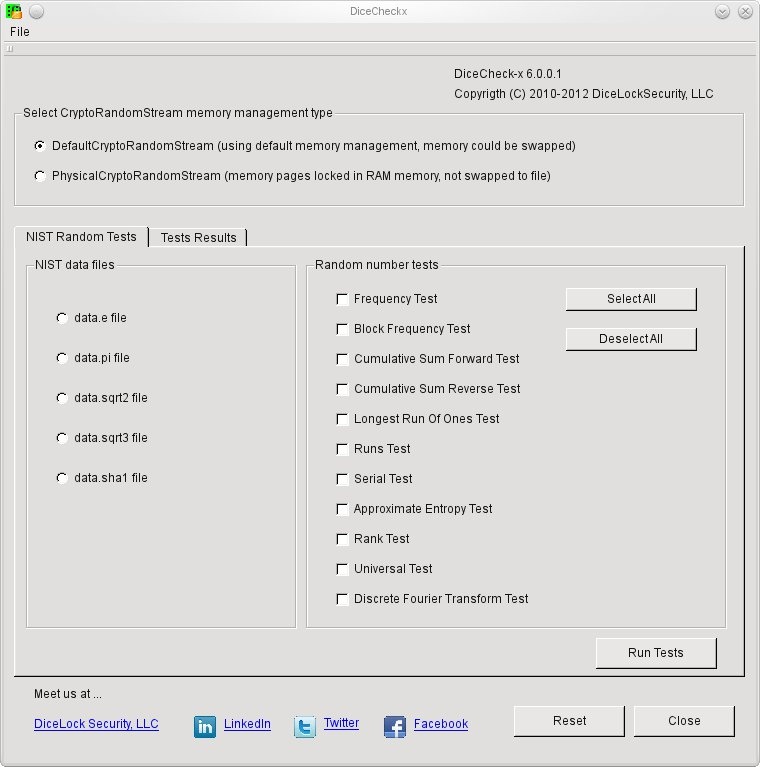
FREE DiceLock Security DiceCheck-x GUI and DiceChecker.so Library.
If in your process or software applications you have need for random number streams and you want to check that the input or output random stream is really at random, you can incorporate DiceChecker-x.so library in your applications to be sure that the random streams are at random.
Incorporate random number tests in your applications. The C++ library contains classes implementing Frequency Test, Block Frequency Test, Cumulative Sum Forward Test, Cumulative Sum Reverse Test, Runs Test, Longest Run Of Ones Test, Rank Test, Universal Test, Approximate Entropy Test, Serial Test, Discrete Fourier Transform Test.
DiceChecker-x 6.0.0.1 is able to share the data with HashDigester-x 6.0.0.1 hash algorithm and DiceLock-x 6.0.0.1 encryption architecture product.
In order to use memory kept in RAM without being swapped to hard disk file, it requires 'root' account to execute the program or RLIMIT_MEMLOCK soft resource limit must be defined to a limit on how much memory the process may lock.
Source Code:
C++ and Java source code for Microsoft Visual Studio, Oracle JDeveloper and Apple Xcode 4.2 projects available at DiceLock Security web site.
About DiceCheck-x
This Components & Libraries program is available in English. It was last updated on 29 September, 2026. DiceCheck-x is compatible with the following operating systems: Linux, Other, Unix.
The company that develops DiceCheck-x is DiceLock Security. The latest version released by its developer is 6.0.0.1.
The download we have available for DiceCheck-x has a file size of 1.0 MB. Just click the green Download button above to start the downloading process. The program is listed on our website since 2012-03-09 and was downloaded 0 times. We have already checked if the download link is safe, however for your own protection we recommend that you scan the downloaded software with your antivirus. Your antivirus may detect the DiceCheck-x as malware if the download link is broken.
How to install DiceCheck-x on your Windows device:
- Click on the Download button on our website. This will start the download from the website of the developer.
- Once the DiceCheck-x is downloaded click on it to start the setup process (assuming you are on a desktop computer).
- When the installation is finished you should be able to see and run the program.
Program Details
System requirements
Download information
Pricing
Version History
version 6.0.0.1
posted on 2012-03-09
Allowing random number tests to work with memory kept in RAM, memory pages not saved to swap area
version 4.0.0.1
posted on 2011-03-03
Reset to allow redo random test
Disclaimer
External Download
We do not host DiceCheck-x on our servers. We did not scan it for viruses, adware, spyware or other type of malware. This app is hosted by the software publisher and passed their terms and conditions to be listed there. We recommend caution when installing it.
The external download link for DiceCheck-x is provided to you by apps112.com without any warranties, representations or guarantees of any kind, so access it at your own risk.
If you have questions regarding this particular app contact the publisher directly. For questions about the functionalities of apps112.com contact us.
